PHOTOOLEX 4-Color Photography Flashlight Review

If you create YouTube videos, shoot product photography, or just want a fast way to make your shots look more cinematic, the PHOTOOLEX 4-Color Photography Flashlight is a really interesting budget option.

This is not just another basic LED light. What makes it stand out is the combination of red, amber, blue, and white light, plus magnetic gobos that let you project patterns and shapes onto your background or subject. That gives you a lot more creative flexibility than you would expect at this price point.

If you want to check the current price, you can find it here: PHOTOOLEX 4-Color Photography Flashlight on Amazon

What Makes the PHOTOOLEX Light Different?

A lot of affordable content creator lights are useful, but visually boring. They give you brightness, maybe a color temperature adjustment, and that is about it.

The PHOTOOLEX light feels different because it is built for creative effects as much as general illumination.

You get:

  • 4 built-in color modes: red, amber, blue, and white

  • 20 magnetic gobos for projecting patterns and shapes

  • Zoomable beam control for tighter or softer light

  • Portable handheld design

  • Rechargeable battery power

  • Compact size that is easy to toss in a camera bag

For creators who want more dramatic, stylized, cinematic shots without building a full lighting rig, that is a very appealing combination.

Great for Cinematic Lighting on a Budget

One of the biggest reasons this light stands out is how easy it is to create mood.

The red mode works well for dramatic portraits, music-video-style shots, or intense background lighting.
The amber mode is perfect for warm cinematic tones and sunset-style scenes.
The blue mode gives you that cool, moody look that works especially well in tech videos and low-key setups.
The white mode is the most practical for everyday product shots, fill light, and general use.

That range makes this a versatile tool for creators who want to experiment with different visual styles without buying multiple specialty lights.

The Magnetic Gobos Are the Real Hook

The feature that really makes this light fun is the included magnetic gobos.

If you have never used gobos before, they are basically pattern filters that let you project shapes and shadows. That means you can add things like window-light effects, graphic shapes, or textured highlights to your shot.

This is one of the easiest ways to make a scene look more polished and intentional. Instead of just blasting flat light at your subject, you can create depth, separation, and atmosphere.

For YouTubers, filmmakers, and product reviewers, that can make a huge difference on camera.

Easy to Use for Small Studios and Home Setups

Another thing I like about this style of light is that it works well in smaller spaces.

Not everybody has a full studio. A lot of creators are filming in a home office, bedroom, garage, or workshop. A compact spotlight like this is much easier to place than a bulky softbox or larger panel light.

Because the PHOTOOLEX is handheld and portable, you can use it for:

  • YouTube talking head setups

  • Product photography

  • Background accent lighting

  • B-roll and cinematic inserts

  • Desk setup videos

  • Creative portrait shots

  • Social media content

If your filming space is limited, that portability matters.

Who This Light Is Best For

The PHOTOOLEX 4-Color Photography Flashlight makes the most sense for people who care about style and visual impact more than raw output.

It is a strong choice for:

  • YouTubers

  • Content creators

  • Product reviewers

  • Small studio shooters

  • TikTok and Instagram creators

  • Indie filmmakers

  • Photographers who want creative effects

If your goal is to create big, soft key light for an entire room, this is not really the tool for that. But if you want creative practical lighting, moody accents, or pattern projection, it is much more compelling.

Pros

  • Very creative for the price

  • Red, amber, blue, and white lighting modes

  • Gobos add cinematic texture and depth

  • Compact and portable

  • Rechargeable design is convenient

  • Great for content creation and product shots

  • Simple way to make videos look more stylized

Cons

  • Not a replacement for a full-size studio light

  • Best used for accent light, effects, and tighter shots

  • More about creativity than brute brightness

Final Verdict

The PHOTOOLEX 4-Color Photography Flashlight is one of those tools that can make your content look more expensive without costing a fortune.

What I like most is that it is not trying to be everything. It is a creative lighting tool first, and that is exactly why it is interesting. The combination of red, amber, blue, and white light, plus the magnetic gobos, makes it a fun and useful option for creators who want more cinematic shots on a budget.

If you are tired of flat-looking video and want a simple way to add mood, texture, and style to your setup, this is definitely worth a look.

You can check it out here: Buy the PHOTOOLEX 4-Color Photography Flashlight on Amazon

Affiliate Disclosure

As an Amazon Associate, I may earn from qualifying purchases if you buy through my link, at no extra cost to you.
XTEINK X4 Review: Pocket-Sized E Ink Reader for Minimalist Reading

XTEINK X4 Review: The Ultimate Pocket E-Reader for Distraction-Free Reading?

If you’ve ever wished your e-reader was smaller, simpler, and completely distraction-free, the XTEINK X4 might be exactly what you’re looking for.

This is not trying to replace your Kindle. It’s doing something totally different.

Check price and availability here: https://amzn.to/4sJmQgs

What Is the XTEINK X4?

The XTEINK X4 is a tiny, ultra-lightweight E Ink e-reader designed for one thing: reading without distractions.

It features:

  • 4.3-inch E Ink display (220 PPI)

  • Super lightweight design (about 74g)

  • MicroSD storage for loading your own books

  • Support for EPUB and TXT formats

No app store. No notifications. No ecosystem lock-in.

Just your books.

Why This E-Reader Is So Different

Most e-readers today are trying to be tablets. The XTEINK X4 goes in the opposite direction.

It’s:

  • Pocket-sized — actually fits in your jeans

  • Offline-first — load books via microSD

  • Minimalist — no distractions, no clutter

  • Fast to pick up and read anytime

This makes it perfect for:

  • Travel

  • Quick reading sessions

  • Focused, distraction-free environments

  • Backup reading device

Real-World Experience

Using the XTEINK X4 feels… different, in a good way.

Because there’s no WiFi browsing, no apps, and no notifications, you naturally read more. It’s almost like carrying a digital paperback in your pocket.

Features like:

  • Dark mode

  • Auto page turning

  • Custom fonts

  • Bookmarks

…are all there, but nothing extra to get in your way.

Downsides You Should Know

This isn’t for everyone.

Here’s where it falls short:

  • No Kindle, Kobo, or app ecosystem

  • Smaller screen means less text per page

  • File transfer relies on microSD

  • Limited format support compared to premium devices

If you want a full-featured e-reader, this won’t replace it.

Who Should Buy the XTEINK X4?

You’ll love this if you:

  • Want a minimalist reading experience

  • Prefer owning and managing your own book files

  • Need something ultra portable

  • Want a distraction-free device

Skip it if you:

  • Rely on Kindle or cloud libraries

  • Want audiobooks or apps

  • Prefer larger screens

Final Verdict

The XTEINK X4 is one of the most unique e-readers I’ve tested.

It’s not trying to compete with big-name devices. It’s carving out its own lane as a pure, distraction-free reading tool.

And honestly, for the right person, that’s exactly what makes it great.

Grab the XTEINK X4 here

GMKtec M8 Mini PC Review: Ryzen 5 PRO 6650H with Dual 2.5G and OCuLink

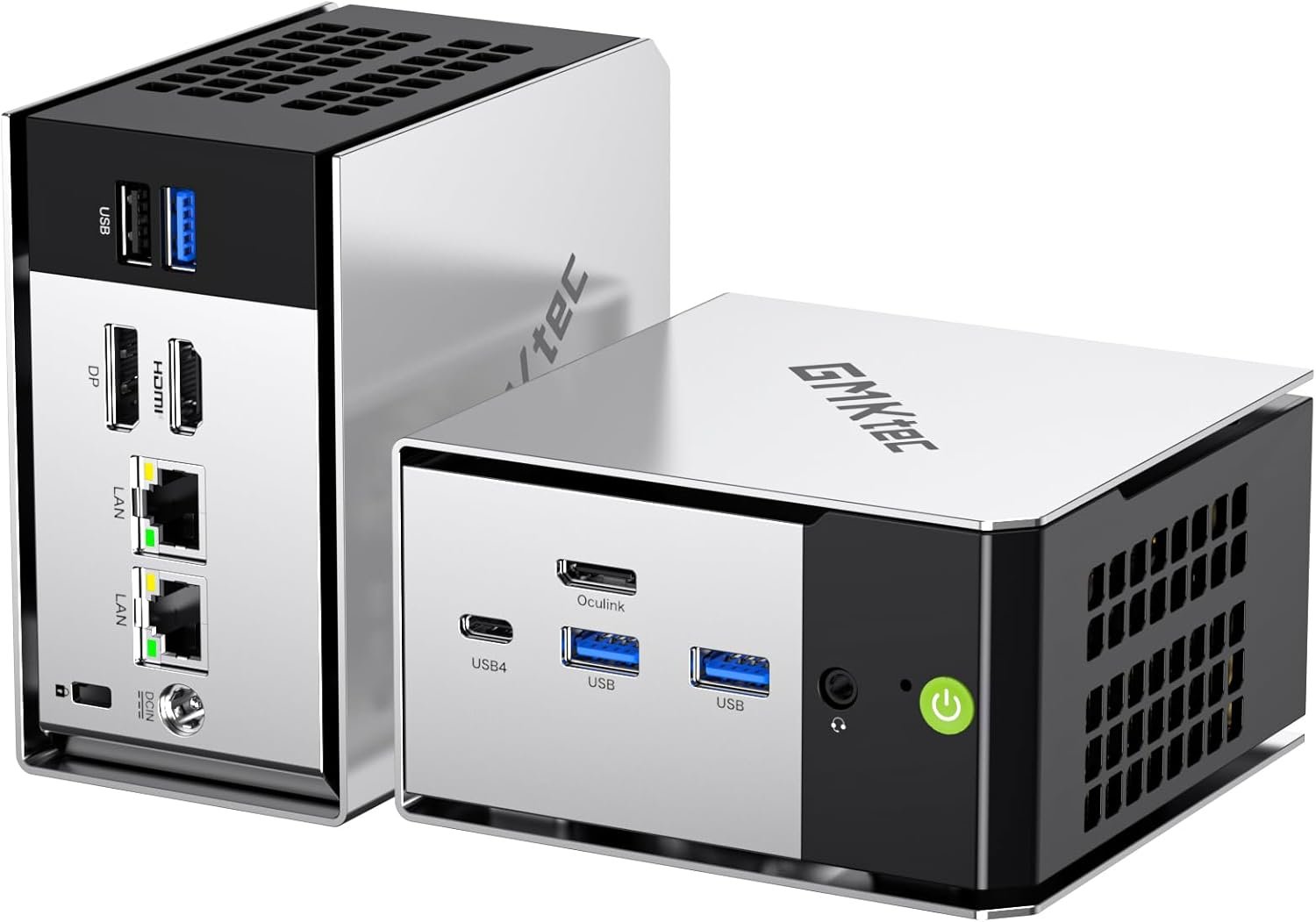
The GMKtec M8 mini PC is not your typical compact desktop. On paper, it looks like another small Ryzen-powered box, but once you look at the ports and internal expansion, it becomes clear this system is aimed at power users, homelab builders, and anyone who needs serious connectivity in a tiny footprint.


Ryzen 5 PRO 6650H Performance

At the heart of the GMKtec M8 is the AMD Ryzen 5 PRO 6650H. This is a 6-core, 12-thread Zen 3+ processor built on a 6nm process. It boosts up to 4.5 GHz and can run up to 40 watts in performance mode.

In real-world use, that means:

  • Smooth multitasking

  • Strong performance for virtualization and containers

  • Plenty of power for Proxmox, Docker, and home server workloads

  • Comfortable 4K media playback

  • Light content creation and casual gaming with the Radeon 660M iGPU

This is laptop-class silicon, but configured in a way that makes it feel closer to a low-power desktop experience.

Serious Networking: Dual 2.5G LAN

One of the standout features of the GMKtec M8 is dual 2.5 gig Ethernet. That immediately puts it in homelab territory.

You can use it for:

  • Router or firewall builds

  • Network segmentation

  • High-speed NAS connections

  • Virtualized network labs

  • Redundant or bonded connections

With WiFi 6E and Bluetooth 5.2, this system's connectivity is far beyond what most mini PCs offer.

USB4 and OCuLink Expansion

This is where the M8 really separates itself.

You get:

  • USB4 with up to 40Gbps bandwidth

  • DisplayPort output through USB4

  • Power delivery support

  • OCuLink for direct PCIe Gen4 x4 expansion

OCuLink is rare in this price class. It opens the door to external GPUs or high-speed PCIe storage solutions without the overhead of traditional USB enclosures. Just remember that OCuLink is not hot-plug safe. Always power down before connecting or disconnecting.

For anyone building a compact but expandable system, this is a big deal.

Storage and Memory

The GMKtec M8 ships with:

  • 16GB LPDDR5 6400MT per second memory

  • 512GB or 1TB PCIe NVMe SSD

The RAM is onboard and not upgradeable, so plan accordingly. However, you do get two M.2 2280 PCIe 4.0 slots internally, supporting large NVMe drives. That means you can scale storage significantly for media servers, backups, or VM labs.

This is NVMe only. SATA drives are not supported.

Triple Display and 8K Support

The M8 supports HDMI, DisplayPort, and USB4 video output for triple monitor setups. It even supports up to 8K output.

For most users that translates to:

  • Clean multi monitor workstations

  • Digital signage

  • High resolution media setups

  • Compact editing or streaming rigs

Who Should Buy the GMKtec M8?

This is not a bargain office mini PC. It is for people who care about I O, networking, and expansion.

It makes the most sense if you:

  • Run a homelab

  • Want dual 2.5G networking

  • Need USB4 for fast external storage

  • Plan to experiment with OCuLink

  • Want a compact but capable virtualization host

If you need upgradeable RAM or a rock bottom budget system, this may not be the right fit. But if connectivity and flexibility matter, the GMKtec M8 is a very compelling option.

Final Thoughts

The GMKtec M8 punches above its size. With Ryzen 5 PRO performance, dual 2.5G LAN, USB4, and OCuLink, it offers features that are still rare in the mini PC market.

For homelab enthusiasts and power users, this is one of the more interesting compact systems currently available.

Check current pricing here:
👉 https://amzn.to/4snuw8l

ORICO Dual USB Flash Drive Review

One Small Drive That Works on Everything

If you are tired of carrying adapters just to move files between devices, the ORICO Dual USB Flash Drive is a simple solution that actually makes sense.

This compact metal thumb drive includes both USB-C and USB-A connectors built into one swivel design. That means you can plug it directly into modern phones and tablets, then flip it around and connect to older laptops or desktop computers without any dongles.


Dual USB-C and USB-A in One Drive

The biggest advantage of this ORICO flash drive is compatibility. It supports:

  • iPhone 15 and newer

  • Android phones and tablets

  • MacBooks and iMacs

  • Windows laptops and desktops

  • Linux systems

  • iPadOS devices

You do not need to install apps or drivers. It is true plug-and-play storage.

If you regularly transfer photos from your phone to your computer, this eliminates friction instantly.

Performance and Speed

ORICO rates this drive at up to 150 MB/s read speed. In real-world use, that is more than enough for:

  • Backing up phone photos and videos

  • Transferring 4K video clips

  • Moving project files between devices

  • Storing presentations or documents

It is not marketed as a high-end professional SSD replacement. It is designed to be reliable, portable storage that works across devices without hassle.

For most everyday users, that is exactly what matters.

Durable Metal Swivel Design

Unlike cheap plastic flash drives, this one uses a zinc alloy metal body with a 360-degree swivel.

Benefits include:

  • Better durability

  • Protection for both connectors

  • Heat dissipation during transfers

  • A more premium feel

It also includes a strap hole so you can attach it to a keychain, bag, or camera case.

Who This Drive Is For

This ORICO USB flash drive is a great fit for:

  • iPhone 15 users who want direct file backups

  • Android users who move files to a PC

  • Students transferring assignments

  • Creators moving footage between devices

  • Anyone who hates adapters

If your goal is simple, portable storage that works everywhere, this drive checks the boxes.

Final Thoughts

There are faster drives on the market. There are larger drives on the market. But there are very few that combine dual USB-C and USB-A in such a compact, affordable package.

For everyday file transfers and backups, this is a practical solution that solves a real problem.

👉 See it here: https://amzn.to/4u0jaYN

MOKiN 8-in-1 100W GaN Charging Station Review: The Clean Desk Upgrade I Didn’t Expect

If your desk looks anything like mine used to, you probably have a power strip, two laptop chargers, a phone brick, a tablet charger, and a random USB hub all fighting for space.

I wanted one device that could actually replace all of it.

After testing the MOKiN 8-in-1 100W GaN Charging Station, I can confidently say this is one of the simplest desk upgrades you can make.

👉 Check current price here:
https://amzn.to/4qHgdub

Affiliate link. If you use it, I may earn a commission at no extra cost to you. As always, all opinions are my own.

What It Actually Is

This is a desktop charging station designed to power up to eight devices at once:

  • 3 AC outlets

  • 3 USB-C ports

  • 2 USB-A ports

  • Up to 100W output on a single USB-C port

  • Built-in retractable USB-C cable

  • Real-time wattage display

It is not a power bank. It is meant to live on your desk or workbench.

Real-World Performance

1. Laptop Charging

The biggest question is always the same:

Can it actually power a laptop?

Yes. If your laptop supports USB-C charging and can take up to 100W input, this will run it properly. I tested it with a high-performance laptop and it delivered full power on a single port.

That matters, because many multi-port chargers advertise 100W total output. This one can deliver 100W to one device when needed.

2. Charging Multiple Devices at Once

Where this really shines is mixed loads:

  • Laptop

  • Phone

  • Tablet

  • Camera batteries

  • Accessories

  • Monitor or desk lamp in the AC outlets

Instead of juggling adapters, everything lives in one place. The desk immediately looks cleaner.

3. The Built-In Display

The front screen shows real-time wattage output.

Is it necessary? No.

Is it useful? Absolutely.

It lets you see:

  • How much power your laptop is pulling

  • Whether fast charging is actually active

  • How load changes when you plug in another device

For tech people, that transparency is nice.

The Retractable Cable

The integrated USB-C cable is either something you will love or ignore.

It keeps things tidy, which I appreciate. That said, this is still a desktop unit. If you want ultra portability, you are better off with a smaller wall charger.

For a permanent desk setup, though, it makes sense.

Build Quality and Size

This is not tiny.

If you are expecting something the size of a wall brick, this is bigger. But that size gives you:

  • AC outlets

  • Better cooling

  • More stable placement

  • A display

For a home office or workshop, the footprint is reasonable.

Who This Is For

This charging station makes the most sense if you:

  • Work from home

  • Have a permanent desk setup

  • Charge multiple USB-C devices daily

  • Want to reduce cable clutter

  • Want a central charging hub instead of scattered bricks

It is especially useful if you run a laptop that pulls high wattage and still want room for everything else.

Who Should Skip It

You probably do not need this if:

  • You travel constantly

  • You only charge a phone and nothing else

  • You want the smallest charger possible

  • You do not care about desk organization

Final Thoughts

The MOKiN 8-in-1 100W GaN Charging Station is not flashy. It is not a gimmick. It is a practical desk solution.

For me, the biggest win was simplicity.

One device.
One location.
Less clutter.
Full laptop power.

If you want to clean up your desk without sacrificing performance, this is a solid option.

👉 Check availability and current pricing here:
https://amzn.to/4qHgdub

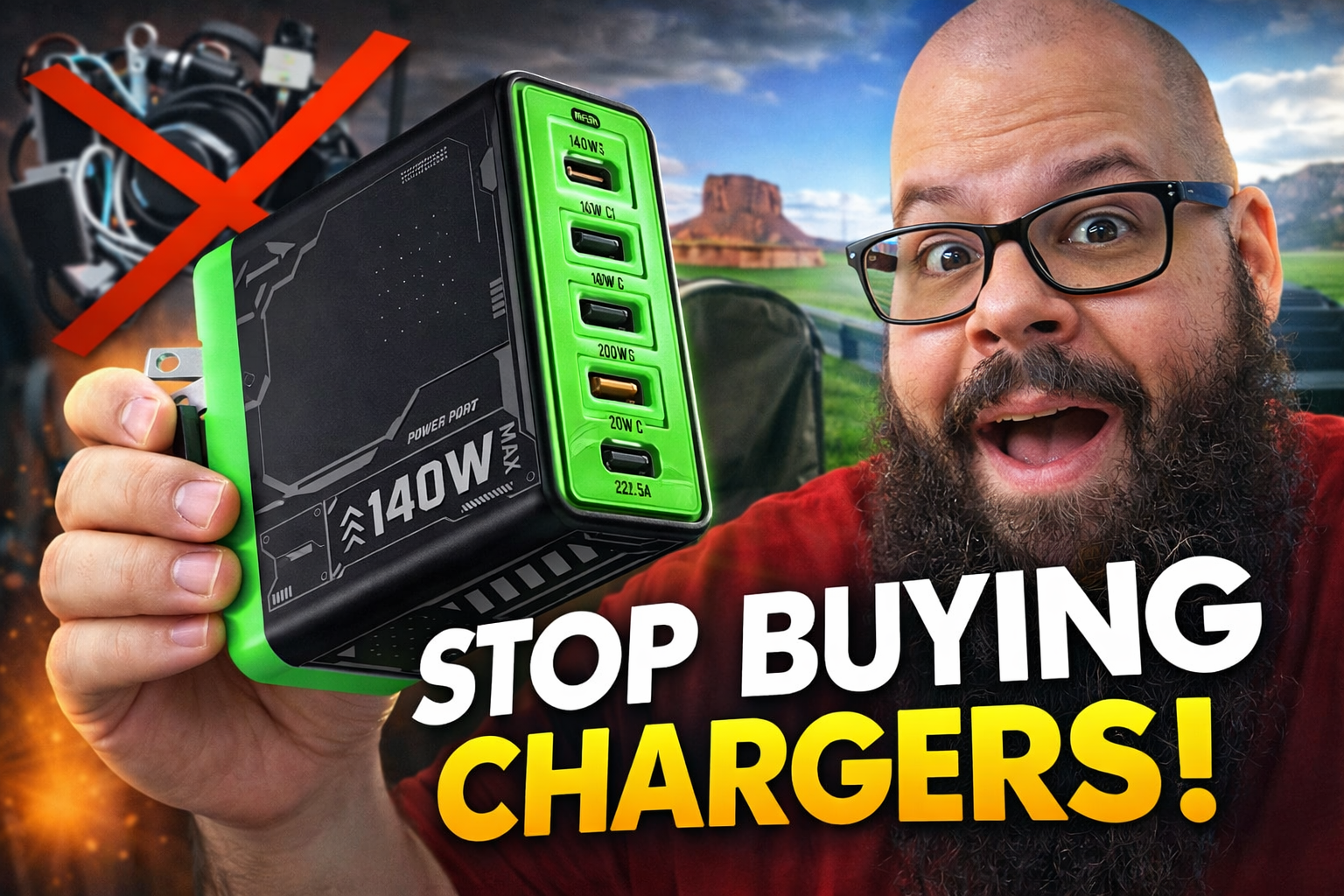
MFish E-Rhino 140W USB-C GaN Charger Review

Can One Charger Replace Them All?

If you are like me, your desk probably has too many chargers. Laptop charger. Phone charger. Tablet charger. Steam Deck charger. Travel charger. It adds up fast.

The MFish E-Rhino 140W USB-C GaN charger is designed to solve that problem. With full 140W output, PD 3.1 support, three USB-C ports, and one USB-A port, this single brick is built to replace an entire drawer of power adapters.

140W PD 3.1 Fast Charging

The headline feature is simple: 140 watts of total output.

This charger supports PD 3.1, which means it can push serious power to compatible laptops like a MacBook Pro while still handling phones and tablets at the same time. In real world use, you can:

  • Charge a laptop at up to 100W

  • Charge a phone simultaneously

  • Power smaller accessories without noticeable slowdown

It is designed to intelligently distribute power across ports, so you do not experience significant throttling when multiple devices are plugged in.

If you travel with a laptop and phone, this alone can replace two separate chargers in your bag.

3 USB-C + 1 USB-A

Port layout matters.

You get:

  • 3 USB-C ports

  • 1 USB-A port

That makes it flexible enough for newer USB-C devices while still supporting older USB-A cables. Whether you are running a laptop, phone, tablet, handheld console, or earbuds, you are covered.

For most desk setups, this means fewer wall plugs and a much cleaner look.

GaN Technology = Smaller, Cooler, More Efficient

Gallium Nitride (GaN) enables smaller, more efficient chargers than older silicon designs.

The MFish E-Rhino is surprisingly compact for a 140W charger. It also includes built-in temperature monitoring and safety protections to help prevent overheating during high-output use.

For a charger that can push this much wattage, the size is impressive.

Travel Ready Design

One of the underrated features is the foldable plug.

If you travel for work or content creation, you know how annoying bulky chargers can be. This one folds flat and replaces multiple chargers in your backpack.

Instead of packing:

  • Laptop charger

  • Phone charger

  • Extra fast charger

You bring one brick.

That is a big win for minimal setups.

Real World Use Case

Here is where this charger makes the most sense:

  • Creators who carry a laptop and phone

  • Desk setups with multiple USB-C devices

  • Frequent travelers

  • Anyone tired of power strip clutter

If you only charge a phone, this is overkill. But if you regularly power a laptop plus other devices, it absolutely earns its spot.

Should You Buy It?

If you want one high-output charger that simplifies your desk and travel setup, this is a strong option.

140W is enough headroom for demanding laptops. Multiple ports mean fewer cables in the wall. GaN keeps it compact.

For people running multiple devices daily, this can genuinely replace several chargers.

See it here: https://amzn.to/4sV5VIh

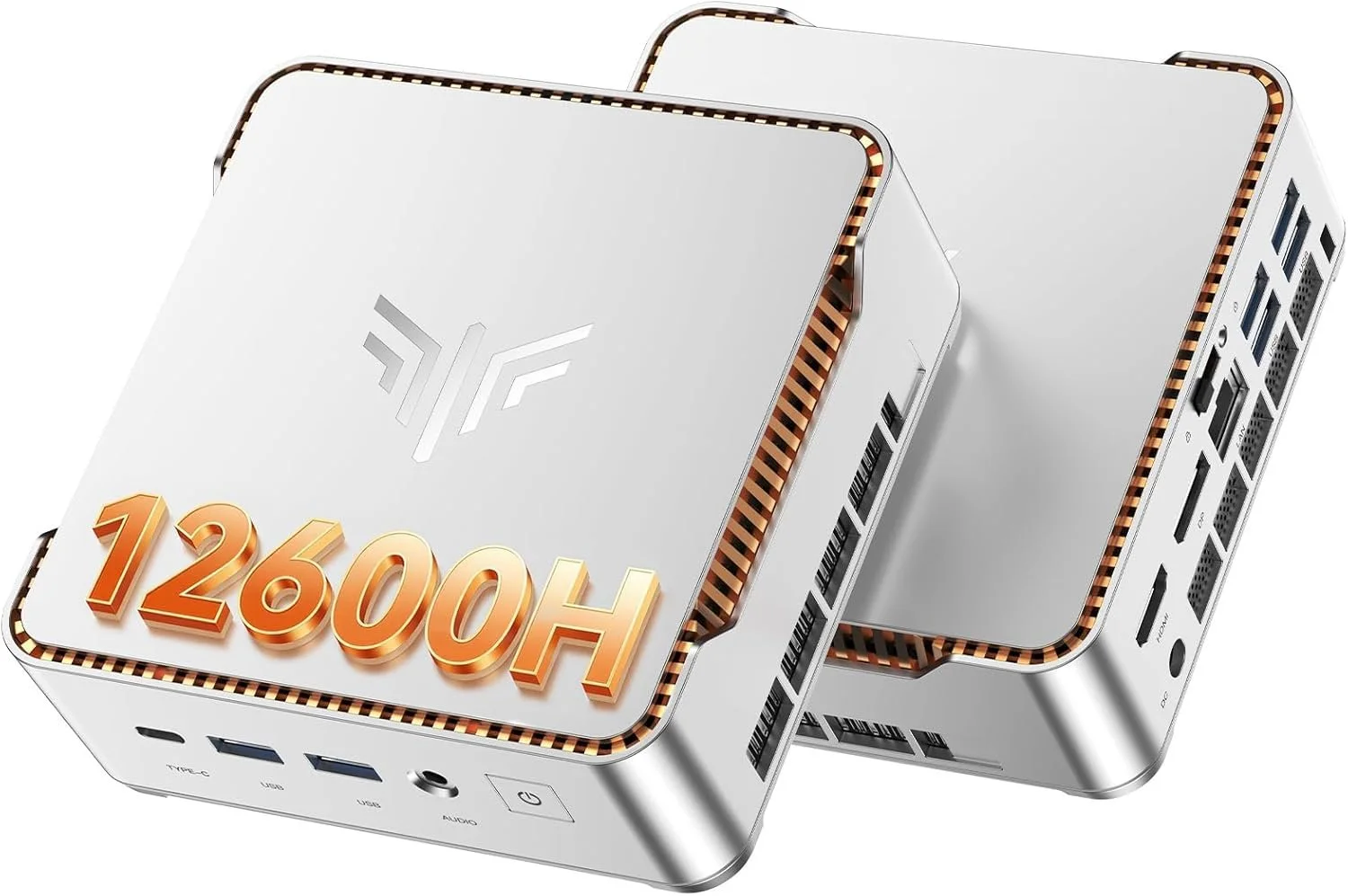
KAMRUI Pinova P2 Mini PC Review (16GB / 512GB) – Intel i5-12600H Power in a Tiny Desktop

If you’ve been looking for a mini PC that actually performs like a real desktop, the KAMRUI Pinova P2 Mini PC (16GB RAM / 512GB SSD) deserves serious attention.

This is not one of those ultra-low-power office boxes. Inside this compact metal chassis is an Intel Core i5-12600H, a 12-core, 16-thread processor that boosts up to 4.5GHz. That is a legitimate laptop-class CPU, and it completely changes what you can expect from a mini PC at this size and price.


Core Specs – KAMRUI Pinova P2 (16GB / 512GB)

  • CPU: Intel Core i5-12600H (12 cores, 16 threads)

  • RAM: 16GB DDR4 dual channel

  • Storage: 512GB NVMe PCIe SSD

  • Graphics: Intel Iris Xe

  • Networking: Wi-Fi 6 + Bluetooth 5.2 + Gigabit Ethernet

  • Display Support: Up to triple 4K @ 60Hz

  • OS: Windows 11 Pro

  • Expandable Storage: Additional M.2 slot

For productivity, homelab use, light gaming, emulation, and content creation, this is a very capable configuration.

Real Performance Expectations

The i5-12600H is the star of the show here. With its hybrid core design, you get strong single-core performance for everyday tasks and plenty of multi-core power for heavier workloads.

This mini PC feels fast in real use:

  • Smooth multitasking with dozens of Chrome tabs

  • Video playback and streaming with zero issues

  • Light photo and video editing

  • Emulation and light gaming

  • Plex server or home server use

  • Office and business workloads

If you are upgrading from an older 8th or 9th gen Intel desktop, you will absolutely feel the jump in responsiveness.

Stability Testing – OCCT Pro Certified

I stress tested this unit using OCCT Pro, running sustained CPU, memory, and power load testing. The system completed extended stress testing with zero errors and earned a System Platinum Stability Certificate.

That means no crashes, no throttling issues, and no instability under heavy load during testing.

You can learn more about OCCT Pro here:
https://www.ocbase.com/occt/pro

For a compact mini PC, passing extended stability testing is a big deal.

Who This Mini PC Is For

This KAMRUI Pinova P2 makes sense for:

  • Home office setups

  • Students who want real performance

  • Homelab builders

  • Plex server users

  • Small business deployments

  • Clean minimalist desk setups

  • Anyone who wants desktop power without a giant tower

It is especially compelling if you want strong CPU performance without stepping into full custom desktop pricing.

Ports and Expandability

You get a very usable port selection, including HDMI, DisplayPort, USB-C, and multiple USB 3.2 ports. It supports up to triple 4K displays at 60Hz, which makes it excellent for productivity and trading setups.

Inside, there is room for storage expansion via an additional M.2 slot, which is always something I look for in mini PCs.

Final Thoughts

The KAMRUI Pinova P2 16GB / 512GB configuration hits a sweet spot.

You get a real 12-core i5 processor, enough RAM for serious multitasking, fast NVMe storage, Wi-Fi 6, Windows 11 Pro, and strong stability under load. In this price bracket, that combination is hard to beat.

If you want something small but legitimately powerful, this is one of the more interesting mini PCs available right now.

Check current price and availability here: https://amzn.to/4kkkq4u

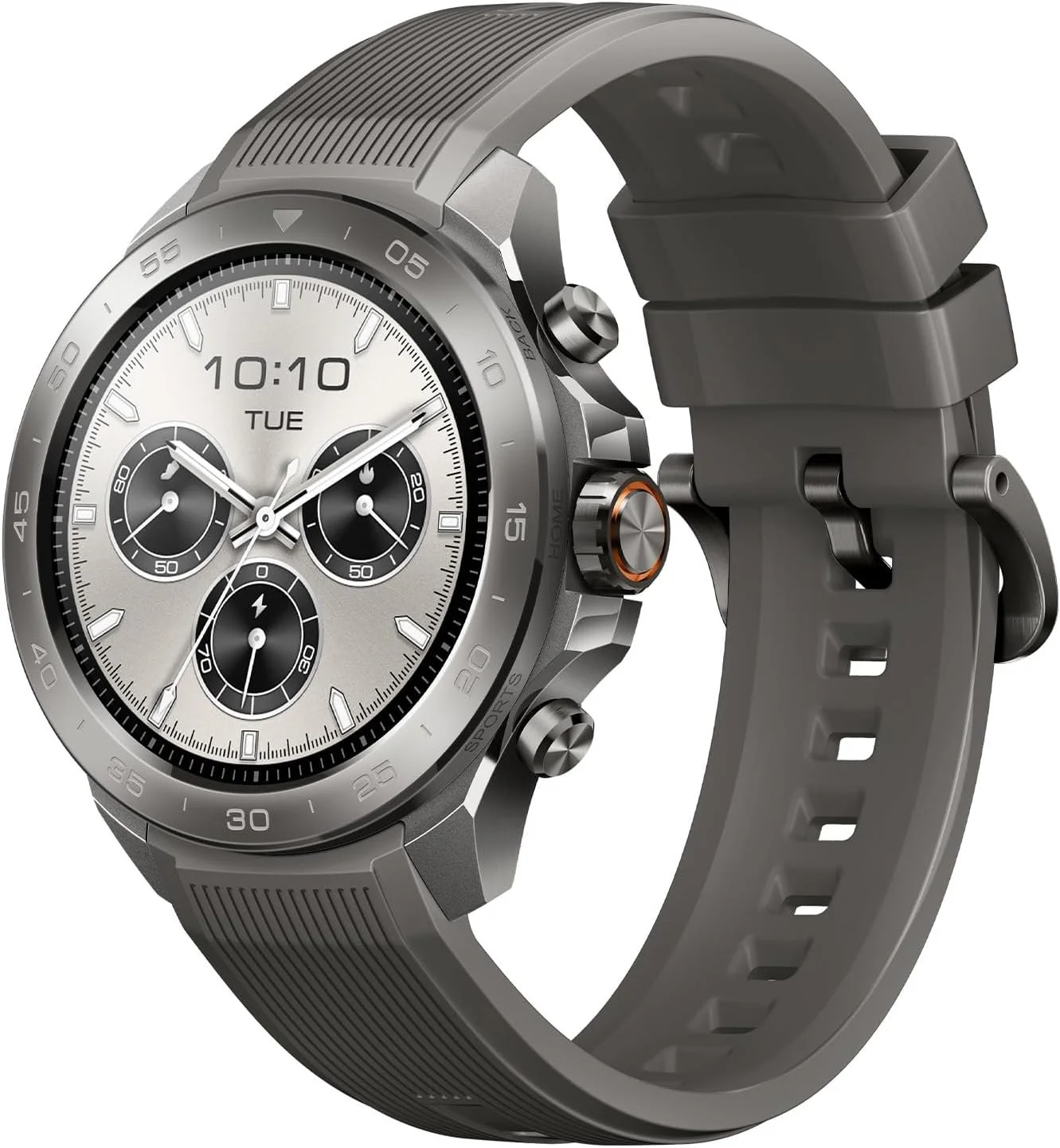
Mibro GS Explorer S Titanium Review: Rugged GPS Smartwatch Built for Real Adventure

If you’re looking for a rugged outdoor smartwatch without paying ultra premium prices, the Mibro GS Explorer S Titanium might surprise you.

This watch brings aerospace grade titanium construction, 10ATM waterproofing, dual frequency GNSS, offline maps, Bluetooth calling, and up to 20 days of battery life into one seriously tough package.

But does it actually perform in the real world?

Let’s break it down.

Built Like a Tank: Titanium Construction

The GS Explorer S features an aerospace-grade titanium alloy body. That means you get the durability and hardness you’d expect from serious outdoor gear, but without the weight penalty of traditional stainless steel watches.

It feels solid. Buttons are tactile. The case has a rugged industrial design that looks purpose-built for hiking, off-road travel, climbing, or water sports.

If you want something that looks and feels like it belongs outdoors, this delivers.

10ATM Waterproof with Bluetooth Calling

This is one of the more impressive features.

The Mibro GS Explorer S is rated for 10ATM water resistance, which means it is built for swimming, surfing, snorkeling, and even freediving up to 30 meters.

What makes it unique is that it still supports Bluetooth calling. High water resistance and built in speaker systems usually do not mix, but Mibro engineered a waterproof speaker design that keeps audio clear while maintaining durability.

For an outdoor smartwatch in this price range, that is not common.

Bright AMOLED Display Built for Sunlight

The watch features a 466x466 AMOLED display with up to 1500 nits of peak brightness.

Translation: it gets bright. Very bright.

In direct sunlight, it remains readable. The 60fps refresh rate keeps animations smooth, and colors are vibrant without looking oversaturated.

If you spend time outdoors, screen brightness matters more than you think.

Dual Frequency GNSS and Offline Maps

This is where the GS Explorer S starts feeling serious.

It supports dual frequency GNSS with L1 and L5 bands. That means improved signal accuracy and better tracking in difficult environments like mountains, forests, or near buildings.

It also supports offline maps. You can download maps to the watch and navigate without cell service. That makes it legitimately useful for hiking and backcountry travel.

You also get route following, deviation alerts, and return navigation.

This is not just a step counter pretending to be an adventure watch.

Battery Life That Actually Lasts

Battery performance is strong:

  • Up to 20 days in daily mode

  • Up to 50 days in basic mode

  • Around 25 hours in GPS mode

For multi day trips, that matters. You are not charging this every night unless you want to.

150+ Sport Modes and Health Tracking

The GS Explorer S includes:

  • 150+ sport modes

  • Heart rate monitoring

  • Blood oxygen tracking

  • Sleep monitoring

  • Stress tracking

  • Training data

It also syncs with Strava, Google Fit, and Apple Health.

For runners, hikers, cyclists, and general fitness users, it covers the essentials.

Who Is This Watch For?

The Mibro GS Explorer S Titanium is ideal for:

  • Outdoor enthusiasts who want rugged durability

  • Budget-conscious buyers who still want serious features

  • Anyone who needs offline navigation

  • People who want strong battery life

  • Those looking for a Garmin alternative without the Garmin price

It is not trying to be a luxury smartwatch. It is trying to be a tough, functional, athletic tool.

And at this price point, it is extremely competitive.

Final Verdict

The Mibro GS Explorer S Titanium punches above its weight.

You get titanium durability, 10ATM waterproofing, dual band GPS, offline maps, bright AMOLED display, strong battery life, and Bluetooth calling in one package.

If you want rugged smartwatch performance without stepping into ultra premium territory, this is absolutely worth a look.

👉 Check current pricing here:
https://amzn.to/4aBuAJF

KEXIN 512GB USB C Flash Drive Review: The One Thumb Drive for USB C and USB A

If you have ever tried to move large files between a phone and a computer, you already know the pain. Adapters go missing, cables turn into a rat nest, and half the “cheap” flash drives you find are painfully slow. That is why the KEXIN 512GB USB-C Flash Drive caught my eye. It is a dual connector drive with both USB-C and USB-A, and it claims up to 1000MB/s transfer speeds on USB 3.2 Gen 2.

Affiliate link if you want to check it out:
KEXIN 512GB USB C Flash Drive: https://amzn.to/4tDJV5b

Quick take

If you want one drive that can plug into modern USB-C devices and older USB-A ports, the KEXIN 512GB dual drive is convenient and surprisingly capable on paper. The real value here is the flexibility. It is the kind of tool you throw on a keychain and use constantly.

What it is

This is a 512GB flash drive with:

  • Dual connectors: USB-C and USB-A

  • USB 3.2 Gen 2 support

  • Claimed speeds up to 1000MB/s

  • A swivel body that covers and protects the unused connector

  • A keychain loop so you can keep it on you

That combination matters because USB C is the new normal on phones, tablets, and a lot of laptops, while USB A is still everywhere on desktops, older laptops, car stereos, smart TVs, and random gear in your life.

Who this is for

Here are the people I think will actually get the most value out of it.

Creators moving big files
If you shoot a lot of photos or video, you know storage fills up fast. A small dual drive like this can be a quick way to dump footage off a phone or tablet, transfer it to a laptop, and keep moving.

Students and work backups
If you are constantly bouncing between computers, classes, or workstations, a 512GB drive is enough to carry projects, presentations, PDFs, and backups without playing the “which device has the latest version” game.

Phone storage relief
If your phone storage is always maxed out, this is a simple way to offload photos and videos. The big benefit is no extra adapters. Plug in and move your files.

Anyone tired of dongles
The best feature might be that it removes friction. Less gear, fewer steps, less annoyance.

What I like

Dual connector convenience
USB-C plus USB-A means you are ready for basically anything. That alone is why these drives are so useful.

Swivel design
No caps to lose, and the connectors are protected when not in use. It is a small detail, but it matters for anything you actually carry around.

512GB capacity
This is a lot of space for a drive that fits in a pocket. It is enough for huge photo dumps, multiple video projects, or a full-on backup stash.

Speed claims that actually matter
The whole “up to 1000MB/s” claim is eye-catching. Even if real-world results are lower, this should still be meaningfully faster than basic USB 3.0 drives for large transfers, especially when your device supports the faster standard.

What to watch for

Real-world speeds vary
Transfer speed depends on the device, the port, the file size, and how the drive behaves under sustained writes. Big sequential transfers usually look best on benchmarks. Lots of tiny files can make a flash drive slower. If speed is the main reason you are buying, you should test it on your exact workflow.

Heat and sustained transfers
Fast small drives can warm up under big transfers. That is normal, but it is worth paying attention to if you are moving huge folders regularly.

iPhone and iPad file management
USB-C iPhones make external storage much easier, but the Files app workflow can still be a little clunky depending on what you are moving. It works, just do not expect it to feel like dragging folders on a desktop.

My favorite use cases

Here are a few realistic ways I would use this in day-to-day life:

  • Quick phone photo and video dump before a trip

  • Moving a giant folder of project files between machines

  • Keeping a “portable emergency kit” of drivers, utilities, and installers

  • Backing up important docs and scans without relying on cloud access

Should you buy it?

If you want a single, simple drive that works with both USB-C and USB-A devices and you like the idea of a lot of storage in a tiny form factor, this is an easy yes. It is especially useful if you often move files between a phone and a computer.

If you need guaranteed top-tier sustained speeds at all times, an external SSD is still the safer choice. But for everyday transfers and portable storage, the KEXIN 512GB dual-connector drive is a really practical option.

Check current pricing here

FAQ

Does it work with USB-C phones?
Yes, it is designed for USB-C devices, including modern phones and tablets.

Do you need an app?
No, it is plug-and-play.

Is 512GB the full usable capacity?
All storage devices show slightly less usable capacity after formatting, so expect a bit under the labeled number.