GMKtec K16 Mini PC Review (Ryzen 7 7735HS): A Small PC That Feels Like a Real Desktop

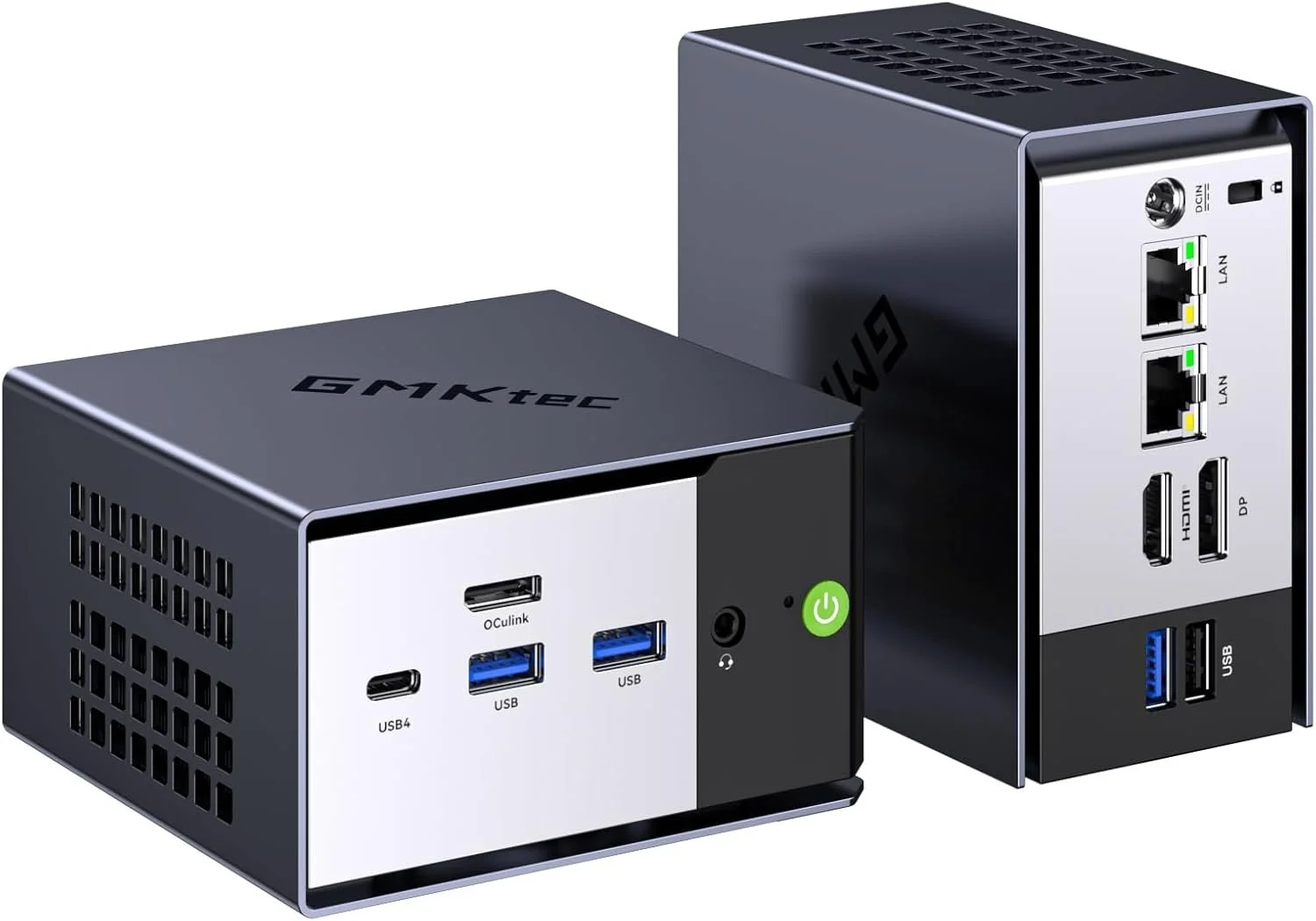
If you have been shopping for a mini PC lately, you have probably noticed two extremes: tiny boxes that feel underpowered, and “high end” mini PCs that get expensive fast. The GMKtec K16 lands in a sweet spot. It is compact, fast enough for real work, and loaded with the kind of ports and connectivity that actually make a mini PC useful.

In this post, I am focusing on the GMKtec K16 with the AMD Ryzen 7 7735HS, and I will also link to the two most common configurations people ask about: 32GB RAM with 1TB storage, and 32GB RAM with 512GB storage.

This did pass the OCCT Platinum test certificate: https://www.ocbase.com/stabilityCertificate/699c2605a51848139eba960b

I now use OCCT Pro for all of my testing: https://www.ocbase.com/occt/pro

Quick Summary: Who the GMKtec K16 Is For

The GMKtec K16 is a great fit if you want:

  • A small desktop for everyday use that never feels sluggish

  • A compact editing machine for 4K video timelines, proxies, and content workflows

  • A home office PC that can drive multiple displays cleanly

  • A light home lab box with fast networking options

  • A living room PC that is easy to mount and easy to hide

If your main goal is modern AAA gaming at high settings, this is not that. It can handle light gaming and esports style titles, but it is not a replacement for a dedicated gaming tower.

Performance: Ryzen 7 7735HS Is the Real Deal

The headline feature is the AMD Ryzen 7 7735HS. This chip has 8 cores and 16 threads, which matters because mini PCs often cut corners with lower-power CPUs. In real-life use, that translates into the K16 feeling responsive even when you are doing multiple things at once:

  • Dozens of Chrome tabs

  • Lightroom exports

  • A 4K timeline in your editor

  • Background downloads

  • Multiple monitors

It is the kind of mini PC you can actually use as a primary computer without constantly thinking about what you should close to “keep it snappy.”
Graphics: Radeon 680M Is Surprisingly Capable

The integrated Radeon 680M graphics are one of the biggest reasons this system feels more “desktop like” than older mini PCs. You are not buying this for high-end gaming, but it is absolutely capable for:

  • Light gaming

  • Emulation

  • Photo editing

  • Smooth 4K playback

  • GPU-accelerated creative apps

For creators, it is the overall balance that matters. CPU performance plus decent integrated graphics makes a big difference.

Storage: 1TB vs 512GB, Which One Should You Buy?

Both configurations can work, but here is the simple rule:

Get the 1TB version if you do any of these:

  • Video editing

  • Storing lots of footage locally

  • Installing multiple big apps or games

  • Running VMs or Docker images

  • Keeping a large photo library on the internal drive

The 512GB version is fine if:

  • You mostly stream media or store files in the cloud

  • You mainly do office work, web, and light creative tasks

  • You already have external SSDs and a workflow that uses them

Most people who message me after buying a mini PC regret underbuying storage, not overbuying it. If the price difference is not painful, 1TB is usually the move.

Ports and Connectivity: This Is Where the K16 Stands Out

A lot of mini PCs look good on paper until you actually try to plug your stuff in. The K16 is much more practical.

You get modern connectivity like USB4, WiFi 6E, Bluetooth 5.2, and dual 2.5G Ethernet. That makes it easier to use as:

  • A workstation with fast external SSDs

  • A home server or NAS companion

  • A multi-monitor desk setup

  • A travel-friendly editing box

Dual 2.5G Ethernet is a big deal if you do anything with local network storage, large file transfers, or a faster home lab setup.

Setup Ideas: How I Would Use It

Here are a few real ways this makes sense:

A YouTube workstation

Pair it with a fast external SSD and you have a clean editing and upload setup that takes up almost no desk space.

A home office PC

If you want a quiet, compact Windows machine that feels fast for years, this checks the box.

A mini home lab node

Dual 2.5G Ethernet opens up some fun options for routing, storage, or self hosted services.

My Bottom Line

The GMKtec K16 hits that rare combo: compact, powerful, and practical. The Ryzen 7 7735HS has enough CPU horsepower to feel like a real desktop, and the overall feature set makes it easy to recommend for creators, home office setups, and anyone who wants a small PC that does not feel compromised.

If you are on the fence between 512GB and 1TB, I lean 1TB for most people, especially if you do any kind of content creation.

Affiliate Links

If you want to support what I do, here are the exact models:

K16 AMD Ryzen 7 7735HS 32GB+1TB: https://amzn.to/4r0nZP0
K16 AMD Ryzen 7 7735HS 32GB+512GB: https://amzn.to/3OOd8KC


OMTech Spectra U1 Pro Review: A Serious Desktop UV Printer for Small Businesses

If you’ve been thinking about getting into UV printing, the OMTech Spectra U1 Pro might be one of the most practical entry points into real production level capability without jumping to a massive industrial machine.

In this review, I’m breaking down what makes the U1 Pro different, who it’s for, and whether it’s actually worth the investment for makers, side hustlers, and small businesses.

Product Page
Use Discount Code: Mercer

TLDR: I love this thing


What Is the OMTech Spectra U1 Pro?

The Spectra U1 Pro is a desktop flatbed UV printer designed for rigid materials like:

  • Acrylic

  • Glass

  • Wood

  • Metal

  • Leather

  • Plastic

  • Crystal labels

Unlike sublimation or inkjet transfers, UV printing cures ink instantly with UV light, allowing you to print directly onto hard surfaces with full color, white ink, and optional varnish effects.

This is not a hobby toy. It’s built for people who want to produce sellable, professional products.

Key Features of the Spectra U1 Pro

Dual Head Performance

The Pro version steps up performance with dual printhead capability. That means faster production and cleaner layering when printing white underbase plus full color.

If you plan to run small-batch production, this matters.

White Ink + Varnish Channels

This is one of the biggest reasons to consider UV printing in the first place.

You can:

  • Print white under dark materials

  • Create layered white for opacity

  • Add gloss varnish for texture effects

  • Create raised spot finishes

That opens up high-margin products like:

  • Acrylic signage

  • Custom tumblers

  • Award plaques

  • Promotional products

  • Branded merch

Automatic Height Detection

The built-in infrared height detection system takes a lot of guesswork out of setup. For most rigid materials, the printer will automatically help you dial in the correct gap.

For transparent materials such as glass or acrylic, you can manually set the distance for precise printing.

This helps prevent head strikes and keeps print quality consistent.

Vacuum Table + Media Stability

The integrated vacuum table keeps your material flat and secure during printing.

If you’ve ever had media shift mid-print, you know how painful that is. The U1 Pro solves that problem cleanly.

Rotary Attachment Capability

With an optional rotary attachment, you can print on cylindrical objects like:

  • Glass cups

  • Tumblers

  • Bottles

That dramatically expands your product offering.

Print Quality

The U1 Pro supports up to 720 x 1440 dpi resolution, which is more than enough for detailed logos, gradients, and photo-style prints.

Color layering is strong, white opacity is solid, and varnish effects look professional when dialed in correctly.

For small business branding, it delivers.

Maintenance and Usability

UV printers require maintenance. That’s just reality.

The Spectra U1 Pro includes:

  • Automatic cleaning cycles

  • Easy access to the capping station

  • Waste ink container monitoring

  • Ink status panel

As long as you follow routine maintenance and keep the machine in standby when not in use, it remains reliable.

This is not a plug-it-in-and-ignore-it machine. But it is manageable.

Who Should Buy the Spectra U1 Pro?

This printer makes sense if you are:

  • Running a custom product business

  • Selling personalized acrylic or metal products

  • Expanding from laser engraving

  • Looking to offer full color direct printing

  • Building a high-margin Etsy or Shopify store

It may not make sense if you only print occasionally or are not prepared for ink costs and maintenance.

This is a business tool.

Is the OMTech Spectra U1 Pro Worth It?

If you want real UV capability without stepping into six-figure industrial equipment, the Spectra U1 Pro hits a sweet spot.

It’s compact enough for a workshop or garage setup, powerful enough for paid production work, and flexible enough to grow with your business.

If UV printing fits your business model, this machine can absolutely pay for itself.

Where to Buy + Discount

You can check out the OMTech Spectra U1 Pro here

Use code Mercer at checkout for a discount.

If you’re serious about adding UV printing to your workflow, this is one of the strongest desktop options currently available.

Final Thoughts

UV printing is one of the fastest ways to increase product value and perceived quality. The ability to print directly on rigid materials with white and varnish unlocks entire product categories.

The OMTech Spectra U1 Pro gives you that power in a footprint that most serious creators can manage.

If you’re building a real product business, it’s worth taking a close look.

ABA Resource Map for Teaching Students with ASD

ABA Resource Map for Teaching Students with ASD

Click any resource box to open the source in a new tab.

ABA Resources for Teaching Students with ASD
Organized by teacher workflow: evidence, assessment, instruction, family supports
Evidence Base
What works and why
Assessment & Planning
FBA and function-based planning
Instruction & Support
EBPs used day-to-day
Family-Friendly Guides
Home-school alignment
NCAEP EBP Report (2020)
Find evidence-based practices by age/outcome
Use to select interventions supported by research and match them to outcomes and age groups.
National Standards Project
Summary of evidence-based autism treatments
Use as a quick reference for evidence categories to guide intervention decisions.
AFIRM Module: FBA
Step-by-step FBA process and materials
Use to train staff and build a consistent FBA workflow for school settings.
IRIS Module: FBA (Elem)
Practice-friendly examples and guidance
Use for educator training with scenarios, decision points, and classroom examples.
PBIS Tier 3 FBA Guide
Comprehensive FBA and function-based planning
Use to align FBAs and plans with Tier 3 PBIS systems and documentation.
AFIRM: Reinforcement
Increase desired behavior with R+
Use to plan and monitor reinforcement systems that support skill acquisition and behavior change.
AFIRM: Differential Reinforcement
DRA, DRI, DRO for behavior reduction
Use to reduce interfering behavior while teaching appropriate replacement behaviors.
AFIRM: FCT
Teach communication that matches the behavior function
Use to replace problem behavior with functional communication responses.
AFIRM: Visual Supports
Increase independence with visuals and routines
Use to support transitions, routines, and task completion with visual cues and schedules.
Autism Speaks: Challenging Behaviors Tool Kit
Family-friendly strategies and guidance
Use to support caregiver understanding and home-school consistency for behavior supports.

The Weirdest Camera I’ve Ever Used… It Sees Sound

Most cameras capture light.
The FOTRIC TD2 acoustic imaging camera captures sound.

That alone makes it one of the weirdest cameras I have ever used. The first time you see the FOTRIC TD2 in action, it immediately clicks that this is not a novelty camera. It is a diagnostic tool that visualizes something humans normally cannot see.

Instead of taking a photo of an object, the FOTRIC TD2 acoustic camera translates sound into a visual heatmap in real time. You are not listening for leaks or noise anymore. You are seeing them.

What the FOTRIC TD2 acoustic camera actually does

The FOTRIC TD2 is an acoustic imaging camera designed to locate sound sources by using a dense microphone array. These microphones detect where sound energy is coming from and overlay that information visually on the screen.

In simple terms, louder sound sources appear brighter and more concentrated. Quieter areas fade away. Even someone with no technical background can immediately understand what they are looking at.

This is what people mean when they say the FOTRIC TD2 lets you “see sound.”

Why using the FOTRIC TD2 feels so strange

Your brain expects a camera to respond to light. Watching the FOTRIC TD2 respond to sound instead feels almost like cheating.

It behaves more like a thermal camera, except the data layer is acoustic energy rather than heat. When a sound source stabilizes on screen, the location becomes obvious in a way that listening alone never achieves.

That moment is usually when people realize how powerful acoustic imaging actually is.

Practical uses for the FOTRIC TD2 acoustic imaging camera

The FOTRIC TD2 is commonly used in professional environments, but the appeal is universal.

Typical use cases include:

  • Locating compressed air leaks

  • Finding vacuum system leaks

  • Identifying refrigerant leaks in HVAC systems

  • Tracking down abnormal mechanical noise

  • Troubleshooting equipment without disassembly

Instead of walking around with soap spray or guessing from sound reflections, the FOTRIC TD2 lets you point and visually confirm the source.

What the FOTRIC TD2 does not do

The FOTRIC TD2 does not calculate leak rate or cost. It does not estimate dollars lost per hour or provide billing numbers.

What it does extremely well is localization. It tells you exactly where the sound is coming from. That clarity alone can save significant time during inspections and diagnostics.

Why seeing sound changes how you troubleshoot

Sound usually exists in a gray area. You hear it, but you are never fully confident where it originates, especially in noisy or reflective environments.

By using an acoustic camera like the FOTRIC TD2, sound becomes spatial and visual. Troubleshooting becomes faster, calmer, and more precise because uncertainty disappears.

Once you experience it, traditional troubleshooting methods start to feel outdated.

Final thoughts on the FOTRIC TD2

The FOTRIC TD2 acoustic imaging camera reveals a layer of the world most people never think about. It takes something abstract and invisible and turns it into something immediately understandable.

That is why it earns the title of the weirdest camera I have ever used. Not because it is confusing, but because once you understand it, you cannot imagine going back.

Was Jesus Married? Revisiting an Ancient Possibility Involving Three Women

The question of whether Jesus married has resurfaced many times over the centuries, yet most discussions assume a single spouse at most. When we look closely at ancient Jewish culture, early Christian writings, and the intimate relationships described in the Gospels, another possibility quietly emerges: Jesus may have had three wives, traditionally identified as Mary Magdalene, Martha of Bethany, and Mary of Bethany.

Exploring this does not require rejecting traditional theology. Instead, it invites us to consider whether the family structures known among ancient prophets and patriarchs might have continued into the first century without fanfare or controversy. Scripture presents Abraham, Jacob, Moses, and others in households far larger and more complex than modern Western readers expect. In that light, the idea of Jesus having a family life shaped by older patterns of covenant relationships is not as radical as it first appears.

The Social Expectation That Rabbis Married

Jesus is called rabbi repeatedly throughout the Gospels. In the Jewish world of that era, respected teachers were expected to marry. A man who remained single into his thirties would have faced social criticism, suspicion, or claims of irresponsibility. Jewish teachings held that a man was not complete without a wife and children. Most men married by eighteen. Later commentaries state directly that living unmarried was improper for a righteous man.

Yet the Gospels record no criticism of Jesus on this point. His opponents attacked him for many things, but no one accused him of shirking marriage or family. Silence in a culture that was quick to judge men who avoided marriage suggests that Jesus fulfilled the expectation rather than defied it.

The Wedding at Cana: A Closer Look

The wedding at Cana offers a striking detail. Mary is not acting like a normal guest. She behaves as if she has responsibility for the event, directing servants and managing the crisis when the wine runs out. This is the posture of a woman connected to the groom’s household.

In Jewish custom, the groom’s family provided the wine. This explains why the master of ceremonies praises the bridegroom for the quality of the wine, even though Jesus produced it miraculously. It fits neatly if Jesus was either the groom or someone in the groom’s immediate family.

This moment also aligns with something Jesus and John the Baptist consistently say: Jesus is the bridegroom. Many interpret that only symbolically, but metaphors often grow from lived reality. If a man literally fills a covenant role in his household, the symbolism becomes richer, not weaker.

Early Christian Writings Hint at Intimate Partnerships

Outside the New Testament, several early Christian texts show no discomfort in portraying Jesus in close companionship with specific women. The Gospel of Philip refers to Mary Magdalene as his companion, using a word that can denote a spouse or partner. Other texts speak of unity and marital symbolism as central images of entering divine life. This suggests some early believers understood Jesus within the framework of marriage, intimacy, and covenant relationships rather than abstention or isolation.

These writings do not prove anything alone, but they demonstrate that ancient Christians found nothing strange about imagining Jesus in familial roles similar to those of earlier prophets.

A Human Life That Included Covenant and Family

If Jesus experienced hunger, exhaustion, grief, pain, and affection as part of his earthly life, then marriage and fatherhood would not be out of place. Ancient Jewish thought considered a man without a wife and children incomplete. If Jesus came to fully live the human condition, it is not unreasonable to see marriage as part of that path. Rather than viewing family life as a distraction from holiness, ancient believers often saw it as part of a covenantal pattern stretching back to Israel’s earliest leaders.

The Bethany Household

The family in Bethany adds another layer. The Gospels say Jesus loved Martha, Mary, and Lazarus in a special and intimate way. Martha’s tone when she complains to Jesus about Mary resembles household frustration more than a disciple criticizing a teacher. The titles they use when speaking to him were commonly used by wives for husbands in that cultural setting.

After the resurrection, Jesus appears first to Mary Magdalene. In a world where family ties were sacred, this aligns with the idea that he would seek out his closest covenant companion.

Even Isaiah 11:1 speaks of a branch from the line of Jesse that will bear fruit. Many interpret that fruit spiritually, yet nothing in the prophecy restricts it to symbolic meaning. A lineage, after all, is something rooted in real families.

A Pattern as Old as Scripture

When all these pieces are placed side by side, a picture forms that matches much of the ancient world’s understanding of covenant households. Prophets and patriarchs often lived within family structures larger than a single pair bond. These were not viewed as deviant or scandalous but as part of a sacred order meant to expand lineage, posterity, and covenant responsibility.

If Jesus followed the pattern of earlier holy men, marrying and forming a household that included Mary Magdalene, Martha, and Mary of Bethany would not have been unusual, controversial, or even noteworthy to his contemporaries. It may simply have been the continuation of an ancient, divinely patterned way of life that his earliest followers took for granted.

The cultural expectations, textual hints, early Christian writings, and relational dynamics offer a pretty coherent picture that makes the possibility not only plausible but remarkably consistent with the ancient world Jesus lived in.

ComMarker Omni X UV Laser Engraver Review: The Future of Precision Engraving

A New Era of Laser Engraving

The ComMarker Omni X isn’t just another desktop laser — it’s the world’s first smart UV laser engraver, combining industrial-grade precision with an elegant all-metal design and smart features.

Unlike diode or CO₂ lasers, the Omni X uses a 355 nm UV laser beam to deliver micron-level engraving accuracy (0.0019 mm), unlocking new creative possibilities for jewelry, glass, metal, and even edible projects like chocolate engraving.

⚙️ Stand-Out Features

1. LiDAR Auto Focus
No more manual adjustments — Omni X uses a LiDAR ranging system for micron-perfect focus on every surface.

2. ZeroBurn™ Technology
A cold engraving process that prevents scorching on wood, leather, and acrylic, delivering clean edges and crisp details.

3. 3D Crystal Interior Engraving
Engrave inside glass or crystal cubes to create floating 3D designs — the kind you’d normally see in high-end gift shops.

4. Class-1 Safety Design
The fully enclosed OD 5+ UV-blocking shield eliminates the need for goggles and keeps users safe during operation.

5. ColdFront™ 2.0 Thermal System
Keeps the laser cool under continuous operation, preventing heat distortion and extending machine life.

6. SpeedMax™ Motion System
Engraves at up to 10,000 mm/s, making this one of the fastest consumer-grade UV engravers available.

🧰 Bundle Options

Basic Bundle – $3,999
Includes: Omni X (6 W) machine, two field lenses (70 mm & 150 mm), foot switch, lifting platform, material pack, and safety goggles.

Rotary Bundle – $4,259
Includes everything in the Basic Bundle + the R5 Multi-Functional Rotary for curved-surface engraving (tumblers, rings, etc.).

Slider Bundle – $4,499
Includes everything in the Basic Bundle + a Slide Extension, expanding the working area to 150 × 400 mm (6 W) or 250 × 400 mm (12 W).

Ultimate Bundle – $5,089
Includes everything from the Rotary and Slider Bundles + a 100 W fume extractor for cleaner workshop operation.

Creative Applications

  • 3D Crystal Cubes: Engrave photos or logos inside crystal for gorgeous keepsakes.

  • Jewelry & Metals: Engrave gold, silver, stainless steel, and platinum with micro detail.

  • Wood & Leather: ZeroBurn™ tech ensures no scorch marks.

  • Glass & Acrylic: Clean lines with no cracks or haze.

  • Food Art: Yes — it engraves chocolate without melting it.

Software & Connectivity

  • ComMarker Studio: Self-developed platform with remote OTA updates and powerful control.

  • LightBurn Compatible: Works with LightBurn for users who prefer its workflow.

  • USB & Wi-Fi Control: Supports offline jobs and remote management.

⚠️Things to Know⚠️

The ComMarker Studio software is still maturing and LightBurn compatibility is improving, but the hardware itself is exceptional. If you want cutting-edge precision and a safety-first design, the Omni X is a solid investment for both professionals and serious makers.

Final Thoughts

The ComMarker Omni X brings a new level of accuracy and safety to desktop engraving. With LiDAR autofocus, ZeroBurn™ cold engraving, and industrial-grade build quality, it’s a machine that proves UV laser engraving is ready for the mainstream creator market.

👉 Check the latest pricing and bundle options here:
ComMarker Omni X UV Laser Engraver

OMTech Solis Duo Review – One Machine, Two Lasers, Unlimited Potential

When OMTech announced the Solis Duo, it immediately caught the attention of makers, small business owners, and engraving enthusiasts. Why? Because it brings together two of the most powerful laser technologies — fiber and diode — in a single, safety-certified machine. Whether you work with metals, wood, acrylic, leather, or plastics, this all-in-one system means you’ll never need to choose between precision and versatility again.

👉 See the full lineup here: OMTech Solis Duo Pre-Order Page

Dual-Laser Power in One Compact Machine

The Solis Duo features two distinct laser sources working together:

  • A 1064 nm infrared fiber laser for metals like stainless steel, brass, titanium, and copper.

  • A 455 nm blue diode laser for organic materials such as wood, leather, rubber, and acrylic.

Switching between the two lasers is instant and effortless. You can go from engraving a metal keychain to etching a wooden plaque without retooling or changing your setup. It’s a true hybrid laser experience built for speed and convenience.

Precision, Speed, and Safety

The Solis Duo is built from 6061 aluminum alloy, ensuring stability and long-term durability.
Each model delivers up to 10,000 mm/s engraving speed with 0.002 mm accuracy, producing fine details that rival industrial machines.

The fully enclosed body is Class 1 FDA-certified, making it safe to operate in workshops, classrooms, or even home studios. This combination of speed, safety, and reliability makes it a professional-grade system in a desktop footprint.

Built for Creativity and Productivity

Depending on your needs, OMTech offers three configurations of the Solis Duo:

  • 20W Fiber + 20W Diode – Manual focus

  • 30W Fiber + 20W Diode – Autofocus

  • 50W Fiber + 40W Diode – Autofocus and top-tier performance

All three models share a 9.8 × 9.8 inch work area, which is already larger than many competitors. If you need more space, you can add the optional conveyor system to extend your workspace up to 9.8 × 35.4 inches, perfect for long designs or production runs.

Pair it with the rotary axis attachment, and you’ll be engraving cylindrical objects like tumblers, mugs, or rings with precision. Combined with an estimated 100,000-hour laser life, this is a machine designed for serious, long-term use.

Smart Features for Modern Makers

The Solis Duo integrates several features that make operation seamless:

  • A 16 MP HD camera gives you real-time visual alignment, making precise positioning fast and easy.

  • Autofocus capability (on the 30W and 50W models) ensures consistent results across materials.

  • Full compatibility with LightBurn and OMTech Lab software means you can design and engrave using the tools you already love.

From the first project to your hundredth, the user experience stays intuitive, efficient, and accurate.

What Materials It Can Engrave

The beauty of the Solis Duo is its flexibility. Here’s what you can expect:

  • Metals (Fiber Laser): Stainless steel, brass, copper, aluminum, titanium — great for deep engraving, marking, and serial coding.

  • Organics (Diode Laser): Wood, leather, rubber, acrylic, and coated materials — ideal for engraving, cutting, or decorative design.

  • Mixed Materials: Combine both beams in creative workflows for hybrid projects like metal-and-wood signage or leather-and-acrylic branding tags.

This makes it an ideal tool for jewelers, small manufacturers, Etsy shop owners, educators, and custom product designers who want a single machine for multiple applications.

Final Thoughts – Who It’s For

If you’ve ever been torn between buying a fiber or diode laser, the OMTech Solis Duo finally makes that decision easy. It’s a hybrid powerhouse that blends industrial precision with the creative freedom of a diode system.

It’s perfect for:

  • Small businesses producing personalized products

  • Makers and content creators upgrading from entry-level lasers

  • Schools and workshops needing a safe, enclosed setup

  • Professionals who demand versatility without sacrificing performance

This is more than a new laser — it’s the next step in compact engraving innovation.

👉 Learn more or pre-order your Solis Duo here:
https://omtech.com/pages/omtech-solis-duo-pre-order?sca_ref=6800540.7IQun8FJWu&utm_source=affiliate&utm_medium=kols&utm_campaign=ryan-mercer

Affiliate Disclaimer

This post contains affiliate links. If you purchase through one of these links, I may earn a small commission at no extra cost to you. This helps support the channel and future reviews. Thank you for your support!

Anycubic Kobra S1 Combo Review: The Budget Multi-Color Beast

The Anycubic Kobra S1 Combo is shaking up the 3D printing world. With up to 8-color printing, a CoreXY motion system, and speeds up to 600mm/s, it’s aiming squarely at makers who want premium performance at a budget price. After testing it hands-on, here’s what stands out.

Unboxing and Setup

Right out of the box, setup took about 15 minutes thanks to LeviQ 3.0 auto-leveling and the built-in Z-axis offset calibration. The printer arrives well-packaged and mostly assembled, with the ACE Pro color engine connecting easily via signal cable and filament tubes.

Even better, the dryer unit allows you to print and dry simultaneously, reducing filament brittleness and moisture problems — a feature usually reserved for higher-end machines.

Performance and Print Quality

The Kobra S1 Combo’s CoreXY design provides fast, stable motion with excellent detail retention. I hit the advertised 600 mm/s speeds in shorter runs while maintaining clean layer lines.

The 320°C hotend handles PLA, PETG, ABS, ASA, and TPU without clogging. Print noise stays around 44 dB in quiet mode — quieter than most fans in your workspace.

The AI spaghetti detection, belt-tension monitoring, and power-loss recovery all worked reliably in my tests.

Multi-Color Printing

The ACE Pro color system supports 4 or 8 filaments, with auto-refill and anti-tangle detection. Color changes are smooth, though you’ll notice a brief pause between swaps as it purges filament. This printer makes multi-color projects like logos, signage, and cosplay props accessible to hobbyists for the first time at this price point.

Software and Connectivity

Anycubic’s new Slicer Next software (based on Orca) feels responsive, with built-in profiles optimized for the S1. The Anycubic App adds remote monitoring, time-lapse support, and print control via Wi-Fi or USB.

Pros

✅ Multi-color printing (4 or 8 filaments)
✅ Fast: up to 600mm/s
✅ Built-in filament dryer
✅ Quiet 44dB operation
✅ Quick assembly and calibration
✅ Works with all major filaments

Cons

⚠️ Random filament bundle colors
⚠️ Slow flush time between colors
⚠️ Limited camera resolution (480p)
⚠️ Some users report slicer refresh bugs

Final Verdict

At $499 during sale, the Anycubic Kobra S1 Combo feels like a serious rival to machines double its price. For creators who want to dive into multi-color printing without the Bambu Lab price tag, this is a no-brainer.

Buy it here
Save $20 with coupon code: RYANMERCER

Comfortable, durable, ergonomic — without breaking the bank.

If you’ve ever spent hours at your desk editing, filming, or crafting content (and I certainly have), you know how fast a chair can become a source of pain instead of productivity. After testing the new OdinLake L1, I’m confident I found a solid upgrade that delivers serious value.

Built to Last

One of the first things that jumped out: this chair supports up to 350 lbs (≈ 158 kg), which means it’s not just built for the “average” body—it’s built for real, everyday use, with stability and comfort. That kind of weight capacity usually shows up on higher-end chairs, so for the investment you’re making, it’s a big win.

Ergonomics That Actually Work

In my workflow I’m toggling between filming shots, cutting footage, answering community comments, and occasionally doing livestreams. Having a chair that helps me stay comfortable rather than become a distraction is huge.

With the OdinLake L1 you get:

  • A fully adjustable backrest so you can lock in the angle that suits you best (whether you’re upright editing or leaning back to plan a video).

  • Lumbar support that you can fine-tune to hit your lower back in just the right place—no more slumping or feeling like I’m sliding forward.

  • Seat height adjustments that make it easy to set your eye-level with your monitor and keep your feet grounded.

When posture and comfort are dialed in, you get more energy, better focus, and fewer “ouch, I feel that in my lower back” moments.

Comfort AND Breathability

A big piece of what makes me stick with a chair is how I feel after a full day of work. The OdinLake L1 uses a breathable mesh material (vs heavy foam or non-ventilated surfaces), so during long sessions it doesn’t feel like you’re baking in your chair.

The seat is well-padded in just the right way: firm enough to support you, soft enough to feel good. If you’re working at home, filming videos, teaching online, or doing long editing sessions (yes—I know that’s me), this is a big plus.

Warranty & Peace of Mind

The chair comes with a 5-year warranty (depending on where you purchase), which is worth noting. Why? Because investing in your setup deserves protection. Knowing you’re covered for defects or wear over several years gives you confidence that you’re making a smart choice—not just a temporary fix.

Real-World Thoughts After Use

Since bringing this into my workspace, I’ve noticed:

  • I’m less distracted by discomfort.

  • My posture feels better even after long sits.

  • It fits well in my setup (the visuals matter for YouTube shots).

  • The build quality feels stronger than what I was expecting at this price point.

Now, there are a few things to weigh: if you’re super tall (6’ +), check headrest and maximum settings carefully. Also, if you thought you needed a separate footrest option—this one doesn’t include one out of the box.

My Verdict

If you’re searching for a quality chair that hits the sweet spot of durability, ergonomics, comfort, and value—and you’re not ready to spend thousandsthe OdinLake L1 is a strong contender. Especially for creators like me who spend way too many hours at a desk, it’s a piece of gear that supports your body as much as it supports your workflow.

👉 Buy it here: Affiliate Link
(If you purchase via this link I may receive a small commission at no extra cost to you. Thanks for supporting my channel/blog and helping me keep bringing useful reviews.)

Final Tip for You

Take a few minutes after setup to fine-tune the chair: adjust height so feet rest flat, set lumbar pad to the curve of your lower back, adjust armrests so your shoulders relax. Spending that 5 minutes now will pay off in hours of comfort later.